


10X Your OpenClaw AI Setup 2026: Ultimate Guide
February 14, 2026 | by nearme.sg

Look, if your OpenClaw setup is basically “a glorified chat box with a brain,” you’re leaving serious money on the table. Like, few Ks per month kind of money.
Here’s the thing most founders don’t realize: the best AI tools 2026 aren’t just smarter, they’re systems. They have routing, uptime monitoring, memory hygiene, security boundaries, tool access, and even team structures. Think of it like running a lean startup, except your employees are AI agents working 24/7 without coffee breaks.
This guide walks you through 10 practical upgrades that’ll transform your basic OpenClaw workflow into an autonomous, reliable, lower-cost AI operator. Whether you’re a solo founder bootstrapping your next big thing or just an AI enthusiast who’s tired of babysitting your chatbot, these tactics work.
Quick Baseline: What “10X” Actually Means (So We Can Measure It)
Before we geek out on routing and multi-agent orchestration, let’s define what success looks like. Track these five metrics:
- Cost per completed task (e.g., dollar per task)
- Median time-to-first-useful output (TTFU, yes, I made that up)
- Task success rate (no manual rescue needed)
- Uptime/reliability (% of runs that don’t crash mid-way)
- Context continuity (does it remember your preferences without bloat?)
Pro tip: Use a simple Google Sheet. Date, task type, model used, tokens/cost, pass/fail, minutes saved. You’ll thank me later when you’re showing your co-founder how much you’ve optimized.

1. Zero-Cost Heartbeats: Offload “Always-On Thinking” to Local Ollama Models
Most of your AI spend isn’t coming from the big brain moments. It’s coming from constant summarizing, drafting, categorizing, formatting, basically, the grunt work.
Move that stuff to local models via Ollama. Your cloud models (the expensive ones) should be reserved for high-stakes reasoning, not routine heartbeat work.
What to offload locally:
- Daily journal summaries
- Email triage drafts
- Meeting notes cleanup
- Simple entity extraction
- “What did I do yesterday?” memory readbacks
Install Ollama, pull a fast small model, and configure OpenClaw routing so low-risk tasks default to local. This alone can cut your monthly bill by 30–40%.
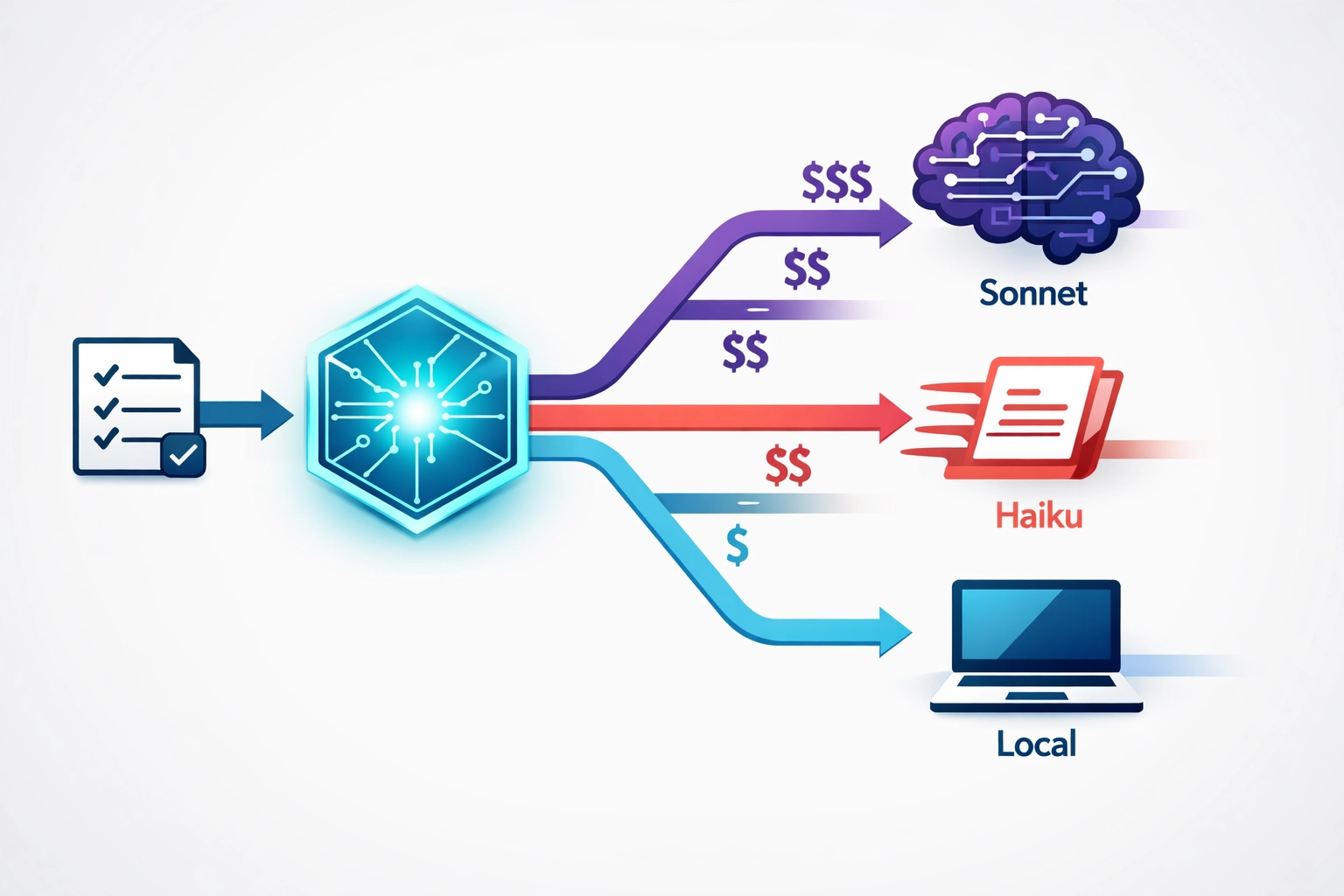
2. Smart Model Routing: Haiku for Routine Work, Sonnet for Logic
If you’re using one model for everything, you’re paying champagne prices for kopi-O work.
Here’s a simple 3-tier router that works beautifully:
Local model (Ollama): Formatting, short summaries, classification
Claude 3.5 Haiku: Routine writing, short reasoning, quick decisions
Claude 3.5 Sonnet: Complex logic, synthesis, multi-step plans, high accuracy
Escalation triggers (use these like if-statements):
- Task requires multi-step reasoning (>5 steps)
- Task has legal/financial/security implications
- Task depends on real-time facts or citations
- User says “double-check,” “verify,” “risk,” or “compliance”
Add a router prompt that classifies each task, attach a cost cap per run, and if you’re exceeding cap, ask the user to confirm escalation. Easy peasy.
3. Self-Healing Systems: A Watchdog for 99% Uptime
Autonomous systems don’t fail dramatically. They fail in the most boring ways possible: tool calls hang, browser automation stalls, API rate limits kick in, processes crash.
A watchdog is your cheapest reliability upgrade. It should:
- Restart OpenClaw workers on crash
- Kill stuck jobs after timeout
- Auto-retry transient errors (HTTP 429, 5xx)
- Rotate logs and alert you on repeated failure patterns
- Run a lightweight “heartbeat task” every few minutes
Deploy with a system service (pm2, supervisor, whatever you fancy), set up a job queue with retries, and create a dead-letter queue for failures you want to inspect manually.
Goal: “If I’m asleep, the system still runs. If it fails, it fails safely and recovers automatically.”
4. Memory Hygiene: Proactive MEMORY.md Updates + Weekly Compaction
Most “my AI got worse over time” complaints? That’s just context rot talking.
If you keep stuffing everything into a single long memory, you get higher costs, slower responses, more contradictions, and outdated preferences creeping back in like that ex who keeps texting.
Use a structured memory file with these layers:
- User profile (stable): tone, preferences, constraints
- Projects (semi-stable): current goals, deadlines
- Operating rules (stable): do/don’t, security rules
- Recent context (rolling): last 7–14 days
- Known truths (curated): facts you verified
Set a weekly compaction ritual (15 minutes tops): remove duplicates, summarize long sections, update current priorities, archive old project notes into ARCHIVE.md.
Memory is a product. Maintain it like one.
5. Advanced Web Search: Brave Search or Tavily MCP for Real-Time Data
If your AI can’t browse properly, it will hallucinate numbers, miss latest policy changes, cite outdated sources, and sound confident but wrong, basically like that one uncle at CNY dinner.
Integrate a real-time search tool via MCP (Model Context Protocol). Among the best AI tools 2026, Brave Search and Tavily MCP stand out for accuracy.
What to use it for:
- Pricing checks
- Policy/reg changes
- Competitor comparisons
- Validating a claim before you publish
- Sourcing citations for blog posts
Search discipline: Always return the query used + top sources + timestamp. Cross-check at least 2 independent sources for important claims. For stats, prefer primary sources (gov data, filings, official docs).

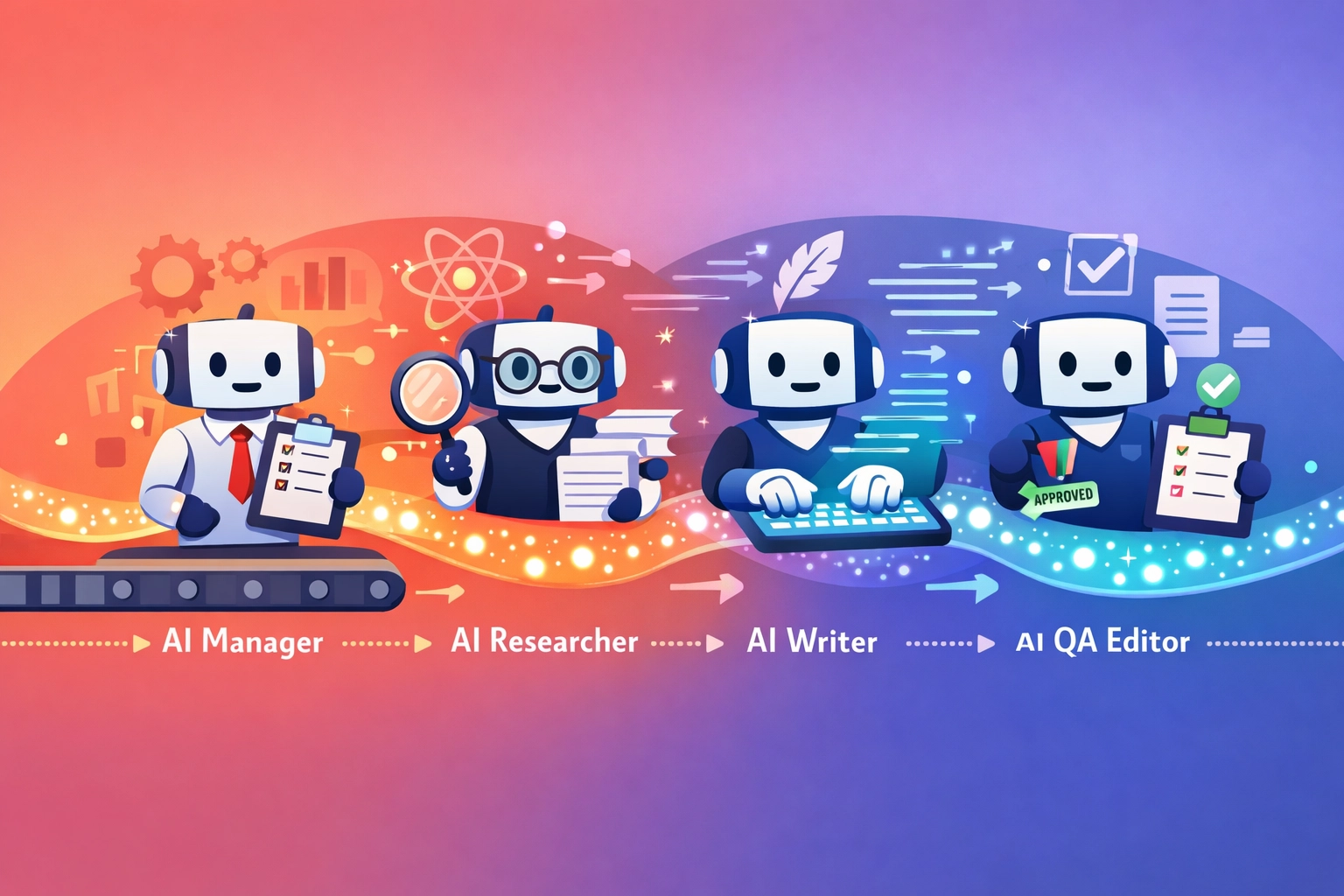
6. Multi-Agent Orchestration: Manager + Researcher + Writer
One model trying to do strategy, research, writing, and QA at the same time? That’s like one person trying to run an entire startup. Slow, messy, and headed for burnout.
A simple multi-agent team instantly improves clarity:
- Manager Agent: Interprets goal, breaks into tasks, routes work, sets acceptance criteria
- Researcher Agent: Gathers sources, extracts facts, flags uncertainty, provides citations
- Writer Agent: Turns research into readable output, matching tone and structure
- QA/Editor Agent (optional): Checks logic, consistency, and “did we answer the question?”
Use sessions_send-style orchestration. Manager receives user goal → sends research task to Researcher → Researcher returns structured notes + sources → Manager sends outline + notes to Writer → Writer produces draft → QA checks for holes and risk flags.
7. Browser Automation: Playwright/Puppeteer for Scraping + Dynamic Interaction
If your AI can only “search and read,” it’s limited. Browser automation lets your agent navigate JS-heavy sites, log in carefully, extract tabular data, click through filters, screenshot evidence, and handle pagination.
High-ROI use cases:
- Competitor price monitoring
- Lead research (public sources)
- Pulling product specs
- Collecting references for market maps
- Auditing your own website for broken pages
Important: Respect robots.txt and site terms. Avoid scraping sensitive personal data. Store only what you need. You’re building a business, not a creepy stalker bot.
8. Security Hardening: “OpenClaw Shield” Against Leaks and Destructive Commands
As soon as you add tools (shell access, browser automation, Slack, Drive), you introduce risk. Your security layer should prevent secrets from leaking and prevent destructive actions from executing.
What “Shield” should enforce:
- Redaction: Never print API keys, tokens, passwords, cookies
- Command allowlist: Only approved commands can run
- Write protection: No deleting production data unless explicit confirmation
- Domain allowlist: Browser automation only allowed on approved domains
- Human-in-the-loop for high-risk actions (money, deletion, sending messages)
This is non-negotiable. One accidental rm -rf and you’ll be crying into your teh-c.
9. MCP Server Extensions: Connect Google Drive, Slack, SQL via Model Context Protocol
Tool access is where OpenClaw becomes a real operator. Among the best AI tools 2026, MCP integrations are game-changers.
High-value MCP connections:
- Google Drive: Read briefs, write drafts, maintain a content pipeline
- Slack: Post updates, collect approvals, send summaries
- SQL/DB: Query metrics, customer data (sanitized), inventory, tickets
Design principle: “Minimum necessary access.” Use separate service accounts, read-only by default, and scoped permissions per agent. Your Researcher shouldn’t have SQL write access, that’s just asking for trouble.

10. Isolated Intern Agents: “Throwaway” Agents for Experiments
The easiest way to break your setup? Test new prompts and tools on your main agent.
Instead, create isolated intern agents with disposable memory, restricted tool access, sandbox data only, and short-lived sessions.
Use them for:
- Testing new scraping flows
- Prompt experiments
- Evaluating new models
- Building new “skills” without contaminating your main memory
Pattern: Intern agent tries → reports outcome → Manager decides whether to promote it into the main system. Simple, safe, effective.
Putting It Together: Your Practical “10X Stack” Blueprint
Here’s a clean blueprint most solo Singapore founders can run without breaking the bank:
🧠 Quick pick your “best OpenClaw host” in 3 minutes (expert 2026 comparison inside)
Core:
- Local Ollama for heartbeats + formatting
- Haiku for routine tasks
- Sonnet for deep reasoning
System:
- Watchdog + job queue + retries
- Memory hygiene with weekly compaction
- Search integration for real-time verification
Automation:
- Playwright/Puppeteer for dynamic sites
- MCP connectors: Drive, Slack, SQL
Safety:
- Shield layer with redaction + allowlists + human confirmations
Team:
- Manager + Researcher + Writer + QA agents
What to Do This Weekend (Fastest Wins)
If you only have 2–3 hours this Saturday morning before heading to the hawker center, do this:
- Turn on model routing (Haiku vs Sonnet)
- Add search tool (Brave/Tavily) for citations + verification
- Implement watchdog + timeouts (stop losing runs)
- Start MEMORY.md and schedule weekly compaction
That alone usually delivers the biggest “feelable” jump: lower cost, fewer failures, and higher output quality.
Closing: Autonomy Is a System, Not a Prompt
People try to prompt their way into autonomy. That works for demos and LinkedIn posts.
In real life, autonomy comes from routing, reliability engineering, memory management, tooling, security boundaries, and multi-agent workflows. Build the system once, and you’ll compound the gains every week.
And hey, if you’re looking for more AI productivity tips tailored for founders, check out NearMe.SG’s blog where we break down practical automation strategies, local business hacks, and the best tools to level up your operations in 2026. We’re building an entire AI productivity content pillar: think OpenClaw router templates, memory compaction checklists, agent security guardrails, and Playwright scraping recipes.
Because the future isn’t about working harder. It’s about building smarter systems that work for you while you sleep. Or while you’re queuing for chicken rice. Either works.
RELATED POSTS
View all


Driving School Or Private Instructor in Singapore: Best Guide
June 21, 2024 | by nearme.sg

Freehold Landed Property in Singapore Under S$5M: Free Expert Guide
June 4, 2025 | by nearme.sg

How to Use an IPL Hair Removal Device at Home: Free Simple Guide
May 28, 2025 | by nearme.sg